
Primeforms Overview

Smarter forms, surveys and booking with AI, data and automations

Primeforms is the no-code platform for creating online forms, multi-step journeys, surveys, quizzes, quote requests and booking pages. Start from an AI prompt, customize everything in the builder, and measure performance with analytics and reports.
AI Forms BuilderMulti-step + logicAnalyticsBooking
No-code · Website embed · Notifications · Integrations · Security · Payments
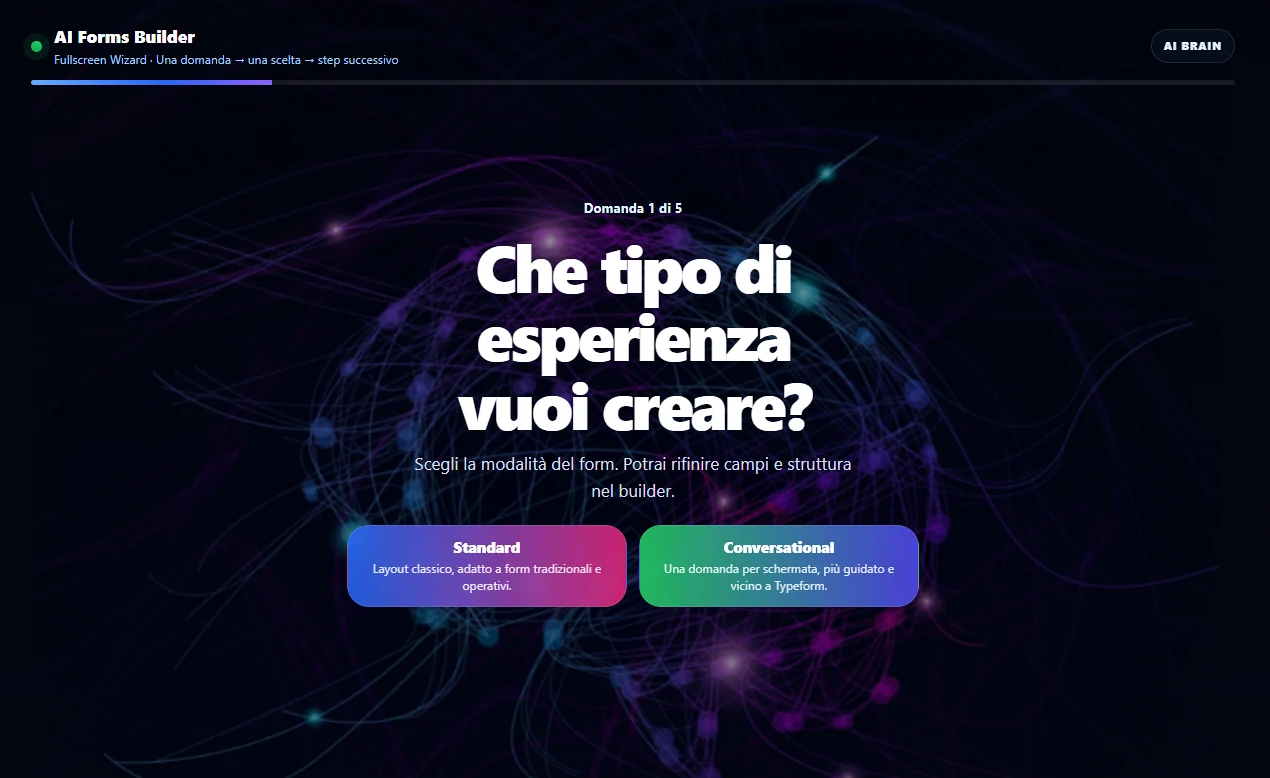
Primeforms AI Forms Builder
Live preview

Primeforms AI Forms Builder interface for creating online forms with artificial intelligence

Prompt → FormGenerate a guided first draft
Conversion FocusClearer steps, copy and structure
Analytics + BookingData, submissions and bookings

AI Builder
from prompt to form

Visual builder
drag & drop

Analytics
submissions and conversions

Booking
requests and appointments

Integrations
workflows and CRM

A complete overview of what you can do with Primeforms

Primeforms is not just a form generator. It is an environment for designing more organized data collection experiences: from form creation to publishing, from submission management to performance measurement.

Create faster

Use AI, templates and a drag-and-drop builder to start from a ready-made structure instead of starting from scratch every time.

Guide users better

Multi-step forms, conditional logic and microcopy help people complete forms with less confusion and less friction.

Measure what happens

Analytics, reports and collected submissions help you understand which forms work and where you can improve the journey.

AI FORMS BUILDER

From a prompt to a more organized form draft

Describe what you want to create: a contact form, quote request, survey, quiz, lead capture flow or booking journey. Primeforms helps you generate a first structure with fields, steps, copy and initial settings.

AI does not replace human review: it gives you a better starting point, so you can focus on the goal, brand, audience and quality of the data collected.

01 · Structure

More logical fields and steps

Organize questions into a clearer flow, especially when a form needs to qualify users or collect a lot of information.

02 · Copy

Clearer microcopy

Titles, descriptions, labels and CTAs help users understand what to do and why completing the form matters.

03 · Design

A cleaner base

Start from an organized structure, then customize colors, fields, steps, style and settings around your project.

04 · Conversion

Less friction

Clearer journeys and more relevant questions can increase the chances that the form gets completed.

All the key features in one platform

Build simple forms or advanced journeys: Primeforms gives you the tools to create, publish, automate and analyze data collection.

Drag & Drop Builder

Build and customize your forms with a visual editor, without touching code.

Conditional logic

Show different fields, steps or messages based on answers and make the journey more relevant.

Multi-step forms

Split complex forms into clearer steps, ideal for qualifying leads and collecting structured data.

Analytics and reports

Analyze submissions, trends and useful signals to improve structure, copy and request quality.

Booking and appointments

Create flows for calls, consultations, events, courses, visits or services that require an organized request.

Integrations

Connect forms and data to the tools you already use, reducing manual steps and follow-up delays.

Email notifications

Receive alerts with submitted data, attachments and useful details as soon as a new response arrives.

Security

Password protection, authorized URLs, invisible honeypot and settings designed to reduce abuse and spam.

Payments

Create forms for sales, donations, paid requests or processes where you need to collect both data and transactions.

Form Analytics● live
Submissions248
Conversion rate12,8%
Step 1
Step 2
Submit

ANALYTICS AND REPORTS

Do not just publish the form. Understand how it is performing.

Analytics turn the form from a simple field container into a measurable tool. You can monitor submissions, read collected data and understand whether the journey is too long, unclear or worth improving.

  • Monitor leads, requests and submissions
  • Spot friction in the form structure
  • Use insights to optimize campaigns, landing pages and follow-up

BOOKING AND APPOINTMENTS

From form to organized request

For many businesses, the value is not just receiving a message, but turning interest into a concrete request: a call, demo, visit, consultation, event or lesson.

With Primeforms you can collect preliminary data and manage a clearer booking journey, useful both for the user and for the team that will follow up.

Consultations and demos

For sales requests, discovery calls, appointments and qualified leads.

Services and events

For studios, centers, courses, training, local businesses and availability-based events.

Booking page

Book a consultation

09:3011:0015:30
Confirm request

What you can create with Primeforms

It is not just about the classic contact form. Primeforms is useful whenever you need to guide someone toward submitting correct, complete and usable data.

Lead generation

Forms for campaigns, landing pages, lead magnets, consultations, quotes and sales qualification.

Surveys and feedback

Questionnaires, NPS, polls, customer satisfaction, internal research or opinion collection.

Booking and registrations

Flows for bookings, events, courses, demos, appointments and requests with preliminary data.

Quotes and requests

Collect useful information before making a proposal, avoiding incomplete emails and unnecessary back-and-forth.

Quizzes and assessments

Create quizzes, assessments, tests, initial diagnostics and interactive journeys to engage users.

Internal processes

Document collection, onboarding, reports, operational requests and forms for internal teams.

Connect forms to the tools you already use

Submissions become truly useful when they enter your workflow: email marketing, CRM, automations, notifications, spreadsheets and operational tools.

integrazioni

Why use Primeforms to create advanced online forms

An online form should not just be a sequence of fields. It should help users understand what to enter, guide them clearly and give your team complete, organized and usable data.

Primeforms was built for this: it combines a visual form builder, AI-assisted generation, multi-step forms, conditional logic, analytics, integrations, notifications, security, payments and booking. You can use it to create contact forms, quote requests, surveys, questionnaires, quizzes, lead magnets, event forms, internal processes and booking journeys.

The AI part helps especially in the initial phase, when you need to turn a goal into a concrete structure. Analytics help after publishing, when you need to understand whether the form collects useful data and whether the journey can be improved. Booking completes the system when the real goal is not just receiving a message, but turning interest into an appointment, request or operational action.

This makes Primeforms useful both for those who want to generate leads from their website and for those who need to collect information, organize bookings, simplify internal processes and improve the way data enters their workflow.

Frequently asked questions

Is Primeforms just a form builder?

No. You can create forms, surveys, quizzes, multi-step journeys, booking pages, forms with advanced logic and data collection flows integrated into your workflows.

Can I create forms with AI?

Yes. AI helps you generate a more organized first draft with fields, steps and starting copy, which you can then customize in the editor.

Are analytics and reports included?

Yes. Primeforms is designed to go beyond form creation: you can monitor submissions, trends and useful data to improve forms over time.

Does Primeforms also handle booking and appointments?

Yes. You can create flows for requests, consultations, calls, events, services and appointments, while also collecting the required preliminary data.

Can I embed forms on my website?

Yes. You can link to forms or embed them on your website, so you can use them inside landing pages, service pages, campaigns and internal processes.

Do I need a credit card to get started?

No. You can start for free and test Primeforms without a credit card.

Create clearer forms. Collect better data. Convert with less friction.

Try Primeforms and build forms, surveys and booking pages with AI, logic, analytics and integrations in one environment.

No credit card required · Start from a template or generate your first form with AI